

One of the most common tactics threat actors use to trick individuals into giving up sensitive information, like login credentials, is phishing emails. According to Proofpoint’s 2024 report 91% of all cyber-attacks start with phishing. The Knowbe4 2024 Phishing Benchmark Report states that 83% of all organizations reported experiencing a successful phishing attack last year. Knowing how to spot and respond to a phishing attempt is a crucial skill for everyone, not just cybersecurity professionals.
What Is a Phishing Email
A phishing email is designed to deceive its recipient into believing it was sent by a trustworthy source. Many phishing emails are sent out in bulk to cast a wide net with no specific recipient in mind. Spear phishing emails on the other hand are carefully crafted to target a specific individual.
Either way, phishing emails are designed to look like typical communications from entities like a bank, tech company, or even a colleague. Their goal is to lure you into interacting with the email by following a malicious link, downloading malware, or entering other confidential information.
Red Flags to Look For
Here are 7 common signs that an email might be a phishing attempt:
1. Generic Greetings
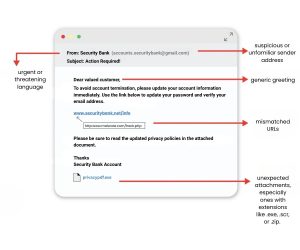
Greetings like “Dear Customer,” or “Attention Account Holder” can be one possible sign of a phish. Legitimate companies typically personalize their emails with your name. This is more common in phishing emails that have been sent out in mass. Spear phishing, or targeted, emails may be addressed directly to you.
2. Urgent or Threatening Language
Threat actors try to create a sense of urgency to hijack your amygdala, encouraging you to act quickly without thinking things through. Look for phrases like:
- “Your account will be suspended unless you act now!”
- “Unusual activity detected – log in immediately!”
3. Suspicious Sender Address
Check the “From” email address carefully. It may look legitimate at first glance but often contains misspellings or unusual domain names (e.g., [email protected]).
Be very wary, some of these can look surprisingly realistic if the threat actor got lucky when setting up their domain. Many threat actors are also buying domains that have the target name in the url (sales-microsoft.com) to make it even harder to spot fake or malicious domains.
Depending on your email service you may get notifications when an email comes from an address you don’t typically communicate with. Don’t just tune this out, it can be a valuable tool to remind you to take that second or third look.
4. Poor Grammar and Spelling
Some phishing emails are riddled with typos and awkward phrasing. Multiple language errors can be a strong indicator that the email is fake. But don’t use this as your only evaluation; with the advent of AI tools many phishing emails are looking a lot more professional.
5. Mismatched URLs
You can preview the URL that a link points to by hovering over any links in the email (without clicking!). If the address looks suspicious, misspelled, doesn’t match the supposed sender, or there are multiple links pointing to the same URL it should be considered highly suspicious.
6. Unexpected Attachments
Most legitimate entities won’t send you unsolicited attachments, especially ones with extensions like .exe, .scr, or .zip.
7. Requests for Personal Information
A trustworthy organization should never ask you to send sensitive details like passwords or Social Security numbers through an unsecured process like email.
What to Do if You Receive a Phishing Email
Report the Email
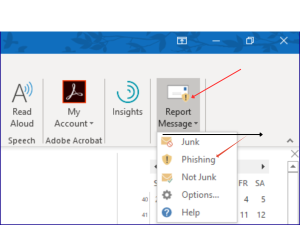
- Work Email: Report it according to your organization’s security protocols. This may include using a “Report Phishing” button or forwarding to your IT/security team. Make sure you understand what your company’s procedures are for this.
- Personal Email: Report directly through the built-in spam/phishing reporting tools of your email client or provider (Gmail, Outlook, Yahoo) or forward the email to a responsible regional entity such the or the FBI’s Internet Crime Complaint Center.
Delete It
Once reported, delete the email from your inbox and trash.
What to Do If You Clicked the Link or Entered Information?
Mistakes happen. If you realize after the fact that you interacted with a phishing email, act immediately:
Change Your Passwords!
If you entered login credentials, change your password for that account right away, especially if you reuse that password elsewhere (and ideally, stop doing that too!).
Enable Multi-Factor Authentication (MFA)
Adding MFA gives your account an extra layer of protection. Even if someone has your password, they won’t get in without the second factor.
Scan for Malware
If you downloaded a file or suspect malware, run a full antivirus/anti-malware scan on your device.
Notify the Right People
- At work: Tell your security or IT team right away. Fast response can limit damage to the organization. This might seem scary to admit a mistake like this, but by doing this you can save the organization from a very costly and serious attack.
- For personal accounts: Contact your bank, email provider, or other affected service immediately. They may monitor for fraud or temporarily lock your account.
Monitor Your Accounts
Keep an eye on your email, and online accounts for unusual activity. Report anything suspicious quickly.
Phishing isn’t just an individual problem; it’s a community risk. By knowing the signs and acting quickly, you help make the digital world a little safer for everyone.
Written by
Faith Kent
Human Risk Analyst, Social-Engineer, LLC